
Products

Folio
A document assistant that runs on your own computer
Ask your documents and get answers with a source. Folio reads your own files, answers in plain language and shows where the information is. Your documents stay on the computer and there is no fee per question.
Updated
How it works
Point to a folder
Folio reads the documents in the folder and keeps up to date when files change. Your original files are never changed.
Ask a question
Write as you would ask a colleague. You can build on the answer with follow-up questions in the same conversation.
Check the source
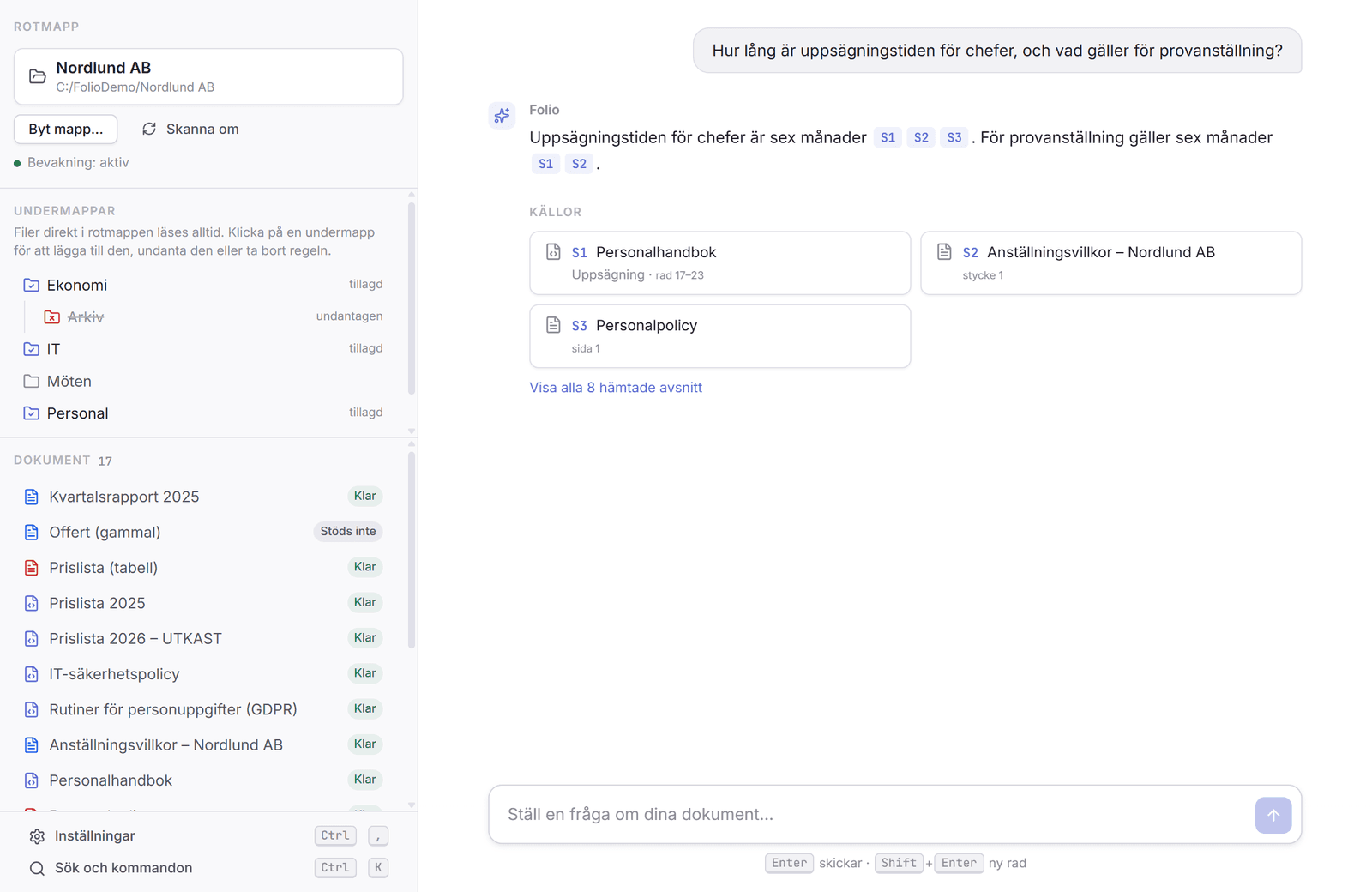
Every statement has a source reference. One click opens the passage in the original, so you can see for yourself what it says.
Get a new file
Ask Folio to summarize several documents in one file. Folio proposes a plan and writes only after you have said yes.
What Folio does
Folio is built for people with many documents who want to find the right information without sending the files to anyone else.
Your documents stay with you
Folio runs entirely on the computer. Contracts, personnel records and minutes are never sent to a cloud service, and Folio collects no telemetry.
Answers you can check
Every answer shows which passages it is based on, with page or line. If the documents contain no answer, Folio says so instead of guessing.
Documents that disagree
Folio reports when documents say different things and points out what is a draft or has been replaced.
Many file types
Word, Excel, PowerPoint, PDF, email, web pages, Markdown and plain text. Scanned pages and images are read with the computer’s own text recognition.
Stays up to date
A new, changed, renamed or deleted file updates the search index automatically. You do not need to run anything by hand.
Memory you control
Folio can save short notes about you and your business to answer better. You see them by asking in the chat, remove them with "Forget", and can turn the feature off.
What it looks like
The examples and the company Nordlund AB in the images are fictional. The interface is in Swedish for now.
Download Folio
Folio is available for Windows 11. A macOS version is on its way.
Version 0.3.0 · Released 2026-10-23 · 20 MB
Checksum (SHA-256)
Compare it with the file you downloaded if you want to check that it is intact.
6d6d852cce491ecfc107fae4abb9c6c01a9823f393711e81f83fdecb1a656ca6Windows may show a warning, because the installer is not yet digitally signed. Click More info and then Run anyway.
Folio downloads more on first start
The installer is about 20 MB, but the program needs its AI models to be able to answer. The first time you start Folio, it downloads them from gothiaai.se, about 5.5 GB. This is done once and can be stopped and continued. After that everything works without internet.
What the computer needs
- Windows 11, 64-bit. Windows 10 has not been tested.
- 16 GB of memory is recommended.
- A graphics card with at least 6.5 GB of free graphics memory gives fast answers. Without one, Folio runs on the processor, noticeably slower.
- About 6 GB of free disk space, 8 GB recommended.
How to install on Windows
Get the installer
Click Download for Windows. The file is about 20 MB.
Start the installation
Double-click the file and follow the wizard. The installation is per user and needs no administrator rights.
Accept the Windows warning
Windows may show "Windows protected your PC", because the installer is not yet digitally signed. Click More info and then Run anyway.
Download the models and ask
Start Folio from the Start menu. The first time, Folio downloads its AI models, about 5.5 GB, once. You can stop and continue later. Then choose the folder with your documents and ask your first question.
Updates and uninstalling
Folio asks gothiaai.se at every start whether there is a new version and asks you before anything is downloaded. Nothing about your documents is sent. The check can be turned off under Settings.
Uninstall under Settings › Apps in Windows. The index, question history and models stay until you delete the folder AppData\Roaming\se.gothiaai.docassistant.
Folio never changes your documents. They stay where they are.
Folio compared with cloud AI services
| Folio compared with cloud AI services | Folio | Typical cloud AI service |
|---|---|---|
| Your documents | Stay on your computer | Sent to the provider’s servers |
| Cost of use | No fee per question | Payment per use or per user |
| Source references | With every answer, with the original text | Varies |
| Internet | Needed for installation and updates | Required all the time |
| Dependence on a vendor | No external service | The vendor’s price, terms and availability |
Privacy and security
- No documents, questions or answers leave the computer, and Folio collects no telemetry.
- Network calls are made only to download the models at first start and to check whether a new version exists. The update check can be turned off.
- The content of your documents is treated as data and never as instructions to the AI.
- Folio never changes your original files and never overwrites an existing file when it creates a new document.
- Everything Folio stores is in a data folder on your computer, and you can open the folder from the status page.
Status and requirements
Folio is an early version (0.3.0, released 2026-10-23) for Windows 11. A macOS version is on its way but has not yet been tried on a real Mac, and Windows 10 has not been tested.
The first time, Folio downloads its AI models, once. After that no internet connection is needed. A graphics card gives faster answers. Without one, the processor is used, which is slower.
The installer is not yet digitally signed, so Windows shows a warning during installation.
The interface is in Swedish, and Folio is built and tested mainly for Swedish documents.
Material to read and try
User manual
The manual as a PDF: first start, questions, sources, settings and status. In Swedish.
Example material
The fictional company Nordlund AB: 20 files with policy documents, price lists in three versions, minutes and scanned pages.
Questions about Folio
Looking for a shared tool for your team?
GothiaAI Portal brings CRM, leads and workflows together with an AI assistant, at a fixed price per team.